Week 2 Reflection
I am so excited to share with you my highs and lows of this week!
Create:
(1) gmail and hotmail account
(2) group contact list and
(3) send definition of learning to the EDET class to group list created in email
But let's reverse a little bit!

We started by looking at the definition of learning. Learning is a permanent change in knowledge, skills and attitudes based on life-long learning experiences. (Mrs. Marsh, 2017)
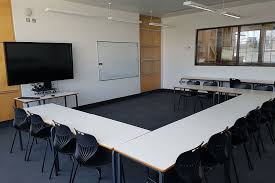
With the classroom in a horse shoe setting to generate whole group interaction, we began looking at 9 types of multiple intelligences, 3 learning styles and types of learners.
Howard Gardner- 9 types of multiple intelligences
The three learning styles:

There are six (6) types of learners (based on preference):
(1) ACTIVE- work best in groups
(2) REFLECTIVE- work best alone
(3) SENSING- work best through exploring experiences
(4) INTUITIVE- likes reading; hates going over things
(5) VISUAL- work best through seeing and body language
(6) VERBAL- work best through hearing
This week we created a Gmail and Hotmail account.
I was overjoyed because it was going to be SO simple since I already had a Gmail and Hotmail account. Or so I thought!

Signing into Gmail required that I (of course) type in my password. What was it again?

I could not remember!
I had to go back to the drawing board and create a new account for both my gmail and hotmail account. Bomber!
Creating my accounts task was now complete. The second task was not to create a group including all student teachers (Primary cohort) and our teacher Mrs. Marsh then write the definition of learning and send to the group contacts. Easy right! Well I thought so too!
Now here’s where the once enjoyable experience was not as enjoyable anymore. I had successfully completed my group but the message wouldn’t send!

To this day I still cannot explain why this was not so on my first attempt and all the steps to creating an account and creating group list was followed.....but hey! I’m just glad it was sent!!
7) Just like with any online service, it's important to choose a strong password—in other words, one that is difficult for someone else to guess.
Here are somethings to observe when sending an email:
Give a good greeting
re-read emails for autography
include an appropriate closing
body needs to connect with the subject from the subject box
acknowledge receipt of emails
watch your tone- bolding and caps send a strong message
have a signature line
have an appropriate email address
use appropriate font size and types for good visibility and finally,
use proper punctuation and grammar.
So incase you (like me) never learnt how to include a signature line I'm here to help!

Step 1: Go to 'settings'
Step 2: Scroll down to where you see 'signature'
Step 3: Select 'signature'
Step 4: In the signature box, write signature eg. name, practice, mode of contacts i.e other email address, quote etc.
Step 5: Save
That's all for this week's reflection! See ya soon...

Create:
(1) gmail and hotmail account
(2) group contact list and
(3) send definition of learning to the EDET class to group list created in email
But let's reverse a little bit!
We started by looking at the definition of learning. Learning is a permanent change in knowledge, skills and attitudes based on life-long learning experiences. (Mrs. Marsh, 2017)
With the classroom in a horse shoe setting to generate whole group interaction, we began looking at 9 types of multiple intelligences, 3 learning styles and types of learners.
Howard Gardner- 9 types of multiple intelligences
The three learning styles:
There are six (6) types of learners (based on preference):
(1) ACTIVE- work best in groups
(2) REFLECTIVE- work best alone
(3) SENSING- work best through exploring experiences
(4) INTUITIVE- likes reading; hates going over things
(5) VISUAL- work best through seeing and body language
(6) VERBAL- work best through hearing
This week we created a Gmail and Hotmail account.
I was overjoyed because it was going to be SO simple since I already had a Gmail and Hotmail account. Or so I thought!
Signing into Gmail required that I (of course) type in my password. What was it again?
I could not remember!
I had to go back to the drawing board and create a new account for both my gmail and hotmail account. Bomber!
Creating my accounts task was now complete. The second task was not to create a group including all student teachers (Primary cohort) and our teacher Mrs. Marsh then write the definition of learning and send to the group contacts. Easy right! Well I thought so too!
Now here’s where the once enjoyable experience was not as enjoyable anymore. I had successfully completed my group but the message wouldn’t send!
For days I kept
resending, re-adding and resending again and again- all to no avail.
My final attempt was on the
fourth day when “VOILA” the message was sent to all the contacts.
To this day I still cannot explain why this was not so on my first attempt and all the steps to creating an account and creating group list was followed.....but hey! I’m just glad it was sent!!
Oh did you want to know what steps I took?

Why didn't you say so!
Why didn't you say so!
Steps:
1) Go to www.gmail.com
2) Click "create account"
3) The signup form will appear. Follow the directions and enter the required information.
4) Review Google's Terms of Service and Privacy Policy, click the check box, then click Next step.
5) Here, you'll have an opportunity to set up recovery options. Recovery options are helpful if you forget your password or if someone tries to access your account. If you don't want to set up recovery options at this time, click Done.
6) Your account will be created, and the Google welcome page will appear.7) Just like with any online service, it's important to choose a strong password—in other words, one that is difficult for someone else to guess.
Here are somethings to observe when sending an email:
Give a good greeting
re-read emails for autography
include an appropriate closing
body needs to connect with the subject from the subject box
acknowledge receipt of emails
watch your tone- bolding and caps send a strong message
have a signature line
have an appropriate email address
use appropriate font size and types for good visibility and finally,
use proper punctuation and grammar.
So incase you (like me) never learnt how to include a signature line I'm here to help!
Step 1: Go to 'settings'
Step 2: Scroll down to where you see 'signature'
Step 3: Select 'signature'
Step 4: In the signature box, write signature eg. name, practice, mode of contacts i.e other email address, quote etc.
Step 5: Save
That's all for this week's reflection! See ya soon...

Comments
Post a Comment